Document redaction software, automated and entirely offline
PII Anomalyzer detects names, SSNs, card numbers, and more across PDF, Word, and Excel, then redacts them permanently. No cloud, no uploads, no API.
- Runs entirely offline
- Windows & macOS
- 7-day free trial
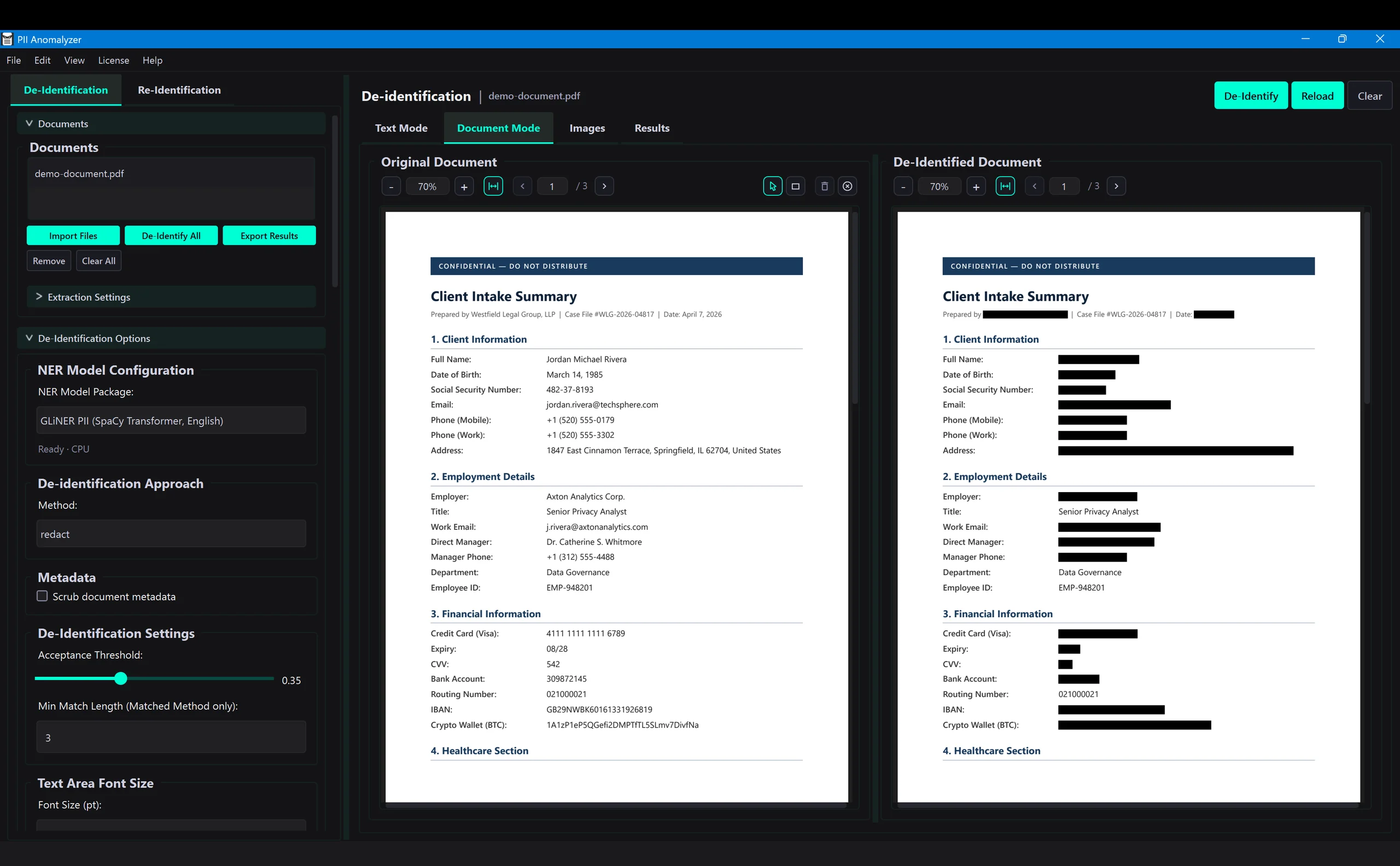
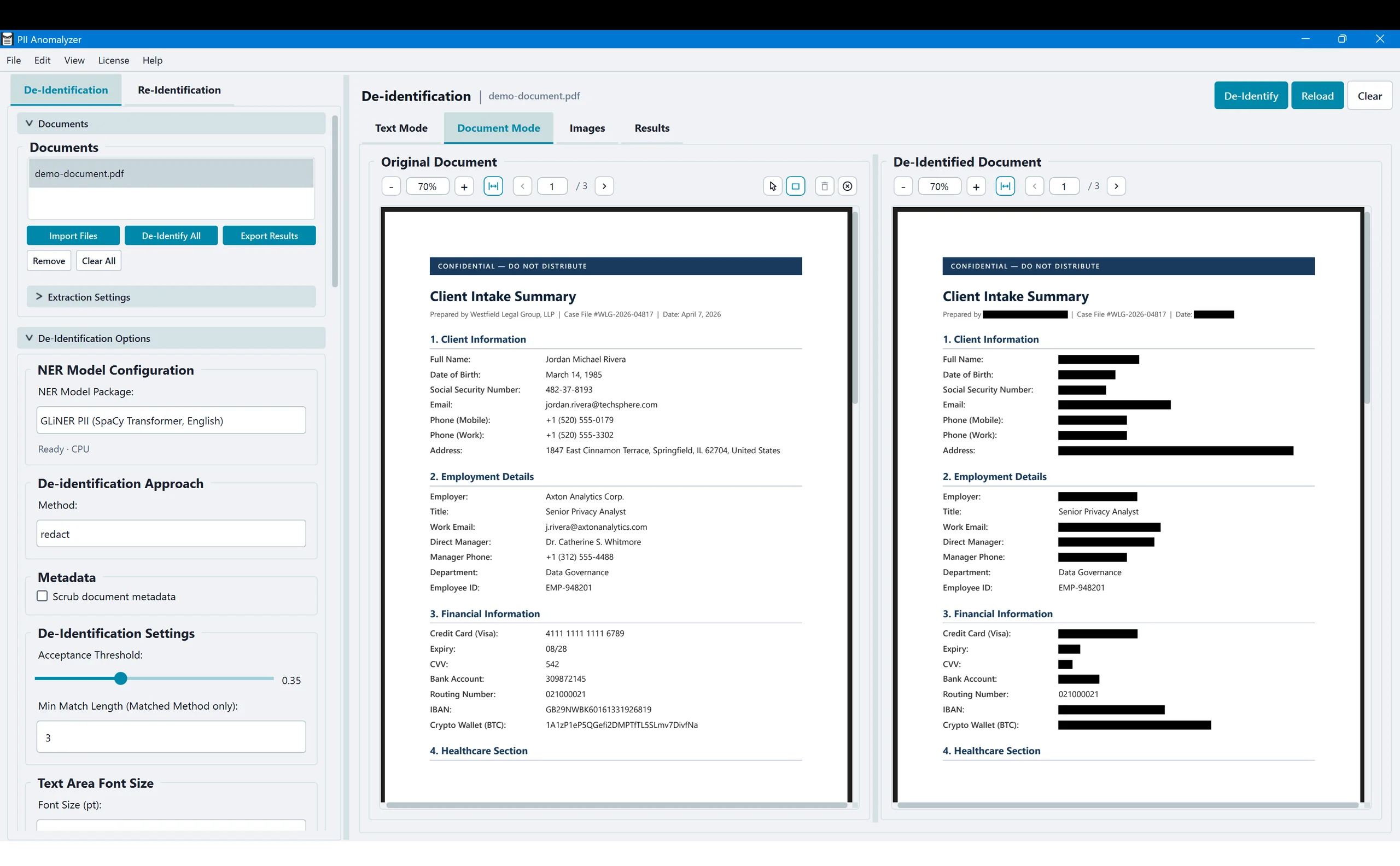
The short answer
Document redaction software permanently removes sensitive information from a file so it cannot be copied, searched, or recovered. The best tools also find that information for you: PII Anomalyzer uses local AI to detect names, SSNs, and account numbers across PDF, Word, and Excel, then redacts them, entirely on your machine.
Redaction that does the finding for you
Most redaction tools hand you a marker and leave you to find every piece of sensitive data yourself. This one detects it, removes it permanently, and never sends a file off your machine.
The AI finds it for you
Stop hunting for every name, account number, and date by hand. Context-aware AI reads the whole document and flags the sensitive information automatically, then lets you review every hit before anything is removed. Run one file or a whole batch.
True redaction, not just black boxes
A black rectangle only hides text, and the words are still in the file. PII Anomalyzer deletes the underlying text, so nothing can be copied or recovered, and can also scrub hidden metadata like author and edit history on export. Draw-to-redact covers signatures, stamps, and handwriting a scan cannot read.
Entirely offline
Every model and every computation runs on your machine. Your documents are never uploaded, and there is no cloud service or API to leak them. Disconnect from the internet and redaction still works.
Built for legal, HR, and compliance teams
From discovery productions and FOIA responses to employee records, contracts, and audit files, teams use PII Anomalyzer to strip personal data out of documents before they are shared. It supports compliance workflows for HIPAA, GDPR, CCPA, FERPA, GLBA, and the EU AI Act, without sending a single file to the cloud.
Because processing is local, there is no data-transfer agreement to negotiate and no new cloud vendor to vet. The documents never leave your control.
From raw document to redacted copy in three steps
Import your documents
Open a PDF, Word, or Excel file, or a whole batch at once. Non-PDF formats are converted to PDF on your machine before processing.
Detect and review
The local AI scans every page and lists each piece of PII it finds, scored and categorized, so you confirm exactly what gets removed before you commit.
Redact and export
Apply permanent redaction, scrub the document metadata, and export a clean copy. Your original file is left untouched.
Want the detailed version? Read the step-by-step guide on how to redact a PDF, or watch the full product tour.
One tool for every format
Redact across the formats your work actually arrives in. Word and Excel files are converted to PDF on your machine, so the redacted output is always a clean PDF.
Native, fillable forms, and scanned
Word
DOCX, converted to PDF locally
Excel
XLSX, XLS, XLSM, XLSB
Scanned documents
Built-in OCR reads the text
Common questions about redaction software
What is document redaction software?
Document redaction software permanently removes sensitive information, such as names, Social Security numbers, and account numbers, from a file so it cannot be copied, searched, or recovered. Unlike a highlighter or a drawn black box, true redaction deletes the underlying text and the hidden metadata. PII Anomalyzer also uses AI to find that information for you, instead of making you mark every instance by hand.
How do I redact many documents at once?
Import the files as a batch. PII Anomalyzer detects PII across every document, lets you review the results in one table, and exports a redacted copy of each one. This is what separates automated redaction software from marking each page by hand in a PDF editor.
Is the redaction permanent? Can the text be recovered?
Yes, it is permanent. The Redact method deletes the underlying text from the PDF layer rather than covering it, so there is nothing left under the black bar to copy or recover. You can also scrub hidden metadata like author name and the XMP stream before export.
Does PII Anomalyzer work offline?
Yes. PII Anomalyzer is a desktop application for Windows and macOS, and all detection and redaction run on your own machine. Your document content stays local and is never sent to a cloud service or an API. The app keeps working with no internet connection.
What file formats can it redact?
PDF, Word (DOCX), and Excel (XLSX, XLS, XLSM, XLSB). Word and Excel files are converted to PDF on your machine first, so the redacted output is always a PDF. Scanned and image-based pages are handled with built-in OCR.
Is this a replacement for Adobe Acrobat?
PII Anomalyzer is focused on detecting and redacting personal information, not on full PDF editing. The difference is automation: instead of finding and marking every piece of sensitive data yourself, the AI detects it for you and redacts it permanently across a whole batch. See the PII Anomalyzer vs Adobe Acrobat comparison for a side-by-side.
Redact your documents the right way
Let the local AI find the PII, redact it permanently, and keep every document on your machine. Try it on your own files for 7 days.
7-day free trial · Windows & macOS · Runs entirely offline